Ways a traveller can answer
How they answer on a question decides what the traveller gets in the chat, and what you have to fill in underneath. There are nine kinds.
| How they answer | The traveller gets | You also set |
|---|---|---|
| Type an answer | A single box | Answer type (text, email, phone, number), shortest and longest answer |
| Fill in several fields | Several boxes in one step | Each field's key, label and answer type |
| Pick one answer | Buttons, one choice | The options |
| Pick several answers | Buttons, several choices | The options, fewest and most they can pick |
| Choose from a list | A dropdown | The options |
| Slide to a number | One slider | Lowest value, highest value, step, unit |
| Slide several values | Several sliders in one step | Each slider, plus rules across them |
| Pick a date | A calendar | Whether past dates are allowed, earliest and latest date |
| Choose rooms | Room pickers with guest counts | Room types with guest limits, fewest and most rooms |
What the traveller actually sends you differs, and that matters when pricing or a condition reads the answer:
- A choice question stores the option's label — the words, not the number
beside them. A condition on "Which holiday?" matches
Beach holiday, not1. - A slider stores a number.
- Fill in several fields, Slide several values and Choose rooms store a set of values, one per field, slider or room.
A question's kind can be changed while the version is a draft. Settings the new kind has no use for are dropped rather than kept out of sight.
What a question stores also decides what a condition can ask about it — a number can be compared with is more than, a set of values only with has been answered.
Each kind in turn
Type an answer
One box. Answer type decides what goes in it, and what is accepted:
| Answer type | The traveller gets | Rejected |
|---|---|---|
| Free text | A plain box | Nothing in particular |
| Email address | A box checked as an address | rachel@, rachel at example.com |
| Phone number | A box checked as a number | Letters |
| Number | A box taking digits | 12abc, words |
Shortest answer and Longest answer count characters, and both are optional. Leave them empty unless you have a reason.
Set to Email address or Phone number, a Verify this answer with a code box appears. Tick it and the traveller is sent a code and must type it back before going on. This is the only thing that turns verification on — connecting the question to the Email address module does not.
Fill in several fields
Several boxes answered as one step — "your name, email and phone" in one go rather than three questions.
Press Add a field for each. A field has a Field key (its short name), a Field label, and its own Answer type, so one step can mix a name, an address and a phone number. Each can be verified separately.
Reference (optional) on a field is worth knowing: without one the answer is readable only as a whole, which is all verification needs. Give a field its own reference and that field becomes readable by pricing, by email, and by conditions in its own right.
Pick one answer, and Choose from a list
Both store one option, and have the same settings — nothing beyond the options themselves. They differ only in how they look: buttons for Pick one answer, a dropdown for Choose from a list. Use the dropdown when the list is long enough that buttons would fill the chat.
Options are covered in The question bank, including Value (optional) for pricing, When chosen for handoff and ending, and showing an option only sometimes.
Pick several answers
The same options, with checkboxes. Fewest they can pick and Most they can pick bound the selection — a traveller who picks too few or too many is told so and cannot continue.
The answer is stored as a list, so a condition on it offers contains and does not contain rather than is.
Pick a date
A calendar. Allow dates in the past is off by default, which suits a departure date and does not suit a date of birth.
Earliest date and Latest date bound it further. A latest date already gone by is refused as you type it — "The latest date has already passed, so travellers could not pick anything. Move it forward, or allow dates in the past." — because the traveller would face a calendar with nothing to pick.
Choose rooms
Room pickers with guest counts, for an enquiry that prices per room.
Press Add a room type for each: a Room type name, then Most adults, Most children and Most guests in total for one of that room. Fewest rooms and Most rooms bound how many the traveller can book in total.
The caps are enforced when they answer, so a traveller cannot put five adults in a double and get a price for it.
Slide to a number
Slide to a number needs four things: Lowest value, Highest value,
Step and Unit shown to the traveller. The unit is cosmetic — nights,
guests, ★.
The editor refuses a setup the traveller could not use, and says why:
- "The highest value must be above the lowest."
- "The step must be more than zero."
A traveller who somehow sends a number outside the range is told "Your answer must be between 2 and 14." — your own numbers in place of those.
Several sliders, and rules across them
Slide several values shows a group of sliders in one step. Press Add a slider for each: a Slider key (the short name rules use), a Slider label, and its own lowest, highest and step.
Under them is Add a rule. A rule is for the thing no single slider can say: "nobody can rate Relaxing 9 and Extreme Adventure 9."
A rule describes what you will not accept
Build the condition for the combination you want to refuse, then write the message the traveller reads when they hit it. Getting this backwards blocks every answer except the one you meant to block.
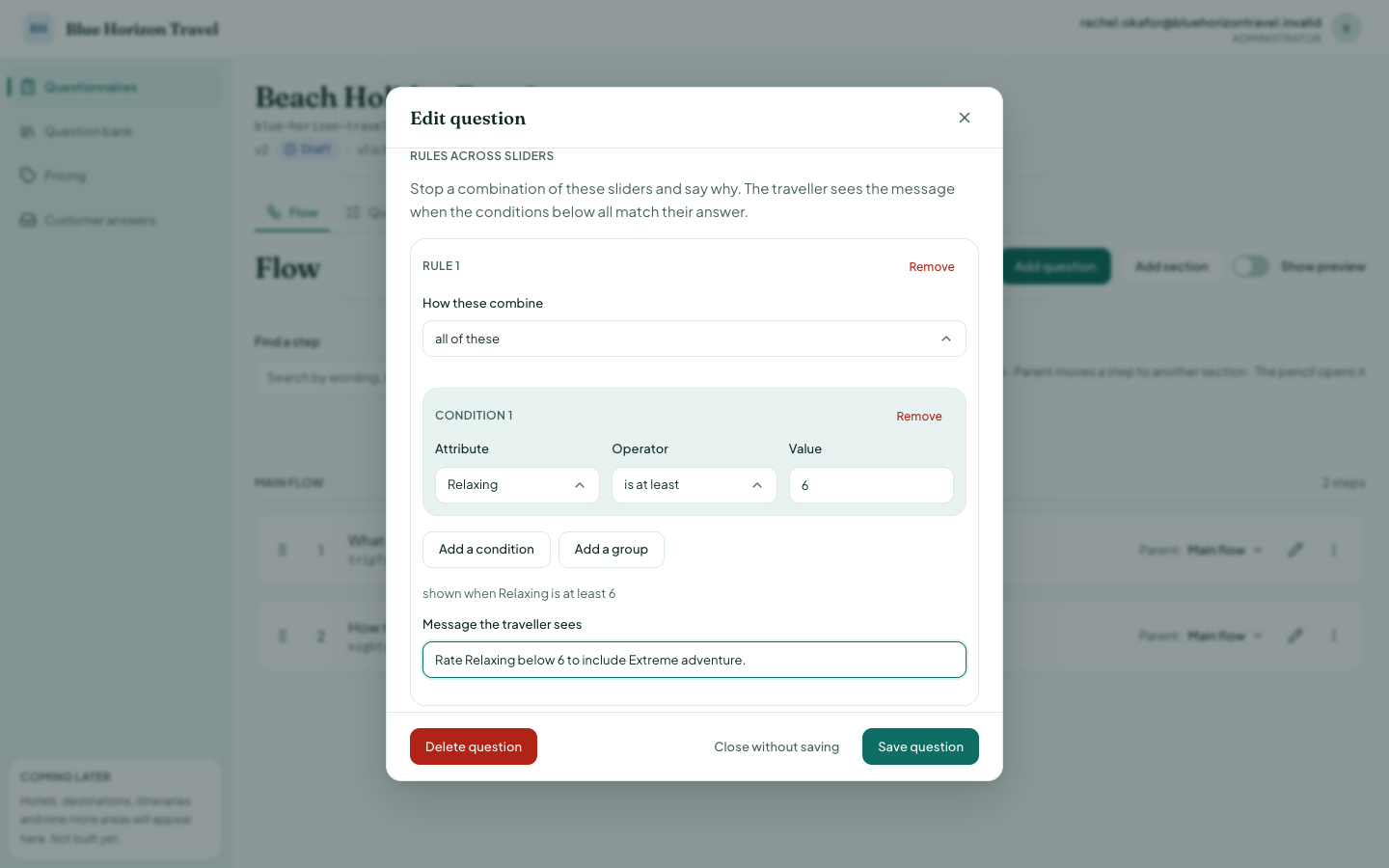
Each rule is numbered and has two parts:
- the condition, built the same way as a question's Only ask this when…, but the sliders of this question stand in for earlier questions.
- Message the traveller sees — e.g. "Rate Relaxing below 6 to include Extreme Adventure."
The message is required, and so is at least one condition. The editor will not save a rule that names a slider this question does not have, because that rule could never fire and nothing on screen would tell you.
Where a traveller sees the error
A rule's message appears inside the sliders, as soon as they move one — they cannot press Continue while it stands. Anything caught later, after they press Continue, appears above the input box instead. Both are read aloud by a screen reader.